RU

YCLIENTS + amoCRM

Bring customers back for repeat visits

Has a customer not visited for a while? The module notices and creates a task in amoCRM — your team just needs to offer the next visit

Works with main integration YCLIENTS and amoCRM

Anna K.
Last visit
60 days ago
Next booking
Not scheduled
Time to return
Offer a repeat visit Task for the administrator in amoCRM

Your customers are already nearby - help them return

Find those who should be offered a new visit - and help the team contact the client in a timely manner

Bring back inactive clients

The module will find those who have not visited you for a long time and have not yet signed up

Pay attention to VIP clients

A ready-made scenario identifies VIP customers who have no upcoming booking

Remind customers about their next visit

Set the interval between visits - the module will tell the team who it’s time to offer the next one

More than 40 client parameters

Know more about the client

YCLIENTS data and metrics are saved in amoCRM customer fields — use them to create precise segments and personalised offers

No recent visit + no upcoming booking

Ready segment for invitation to return visit

YCLIENTS amoCRM

Visits and bookings

  • Last visit
  • Next booking
  • Interval between visits

Purchases

  • Average order value
  • Purchase amount
  • Client LTV

Preferences

  • Favorite service
  • Preferred specialist
  • Main branch

Segment and activity

  • Customer segment
  • Risk of leaving
  • Cancellations and no-shows

Your conditions → the right actions
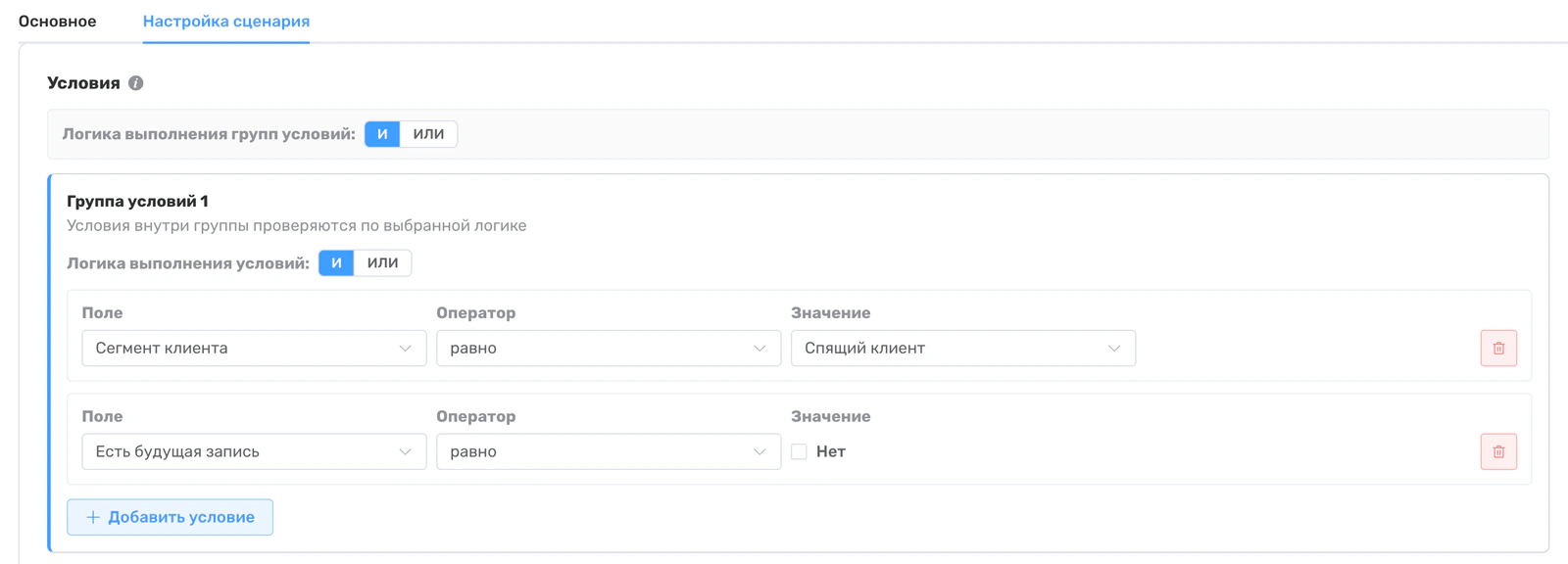
Select which clients to find and define what the module should do in amoCRM

Choose conditions

Segment, visits, purchases or preferences - combine conditions using “AND” and “OR”

Link actions

Create a task, add a tag or note, or change the deal stage — choose one action or several

Set frequency

Limit restarts per client to avoid unnecessary steps

Setting up the inactive Client Scenario: Segment and No Future Record

Pricing plans

Select the payment term for the module

Loading current plans…

Loading prices from services.myrubikon.tech

Give customers a reason to come back

We will select return scenarios for your business and help with connection

Discuss connection

Answers to your questions

Who is this module suitable for?

Businesses where clients return for services and records are kept in YCLIENTS: salons, studios, clinics and other companies that work with a client base in amoCRM

What do you need to connect?

Need YCLIENTS, amoCRM and basic integration between them - client fields must be configured and mapped before launch

How does the module understand who needs to return?

Based on client data: last visit, availability of a future appointment, frequency of visits and other indicators, you select the conditions under which the scenario should work

Are ready-made scenarios available?

Yes. There are templates for inactive customers and VIP customers without an upcoming booking — use them as a starting point and customise the actions in amoCRM

Can I customize the scenario to suit my business?

Yes, you can select one or more conditions, combine them and set the desired actions - for example, take into account the interval between visits and the absence of a next appointment

What will happen in amoCRM?

A scenario can create a task, assign an owner, add a tag or note, or change a field or deal stage — you choose the actions

Does the module itself communicate with the client?

In the scenarios shown, the module creates the next step in amoCRM, and the employee contacts the client and books him for a visit - there are no built-in SMS and WhatsApp newsletters

How to avoid repeated tasks for one client?

In the scenario, you can limit the frequency of re-launch for one client - configure it taking into account how often it is appropriate to offer your services

Where can I see if the scenario worked?

The list of scenarios shows the status, last run and number of triggers in 30 days - the tasks and changes themselves can be checked in the client or deal card

Can you help with setup and launch?

Yes, we will help you check the fields, conditions and actions - first we will check the disabled scenario on test clients and only after checking we will proceed to launch

Send an enquiry — we will carry out a free audit and show you which package suits your business