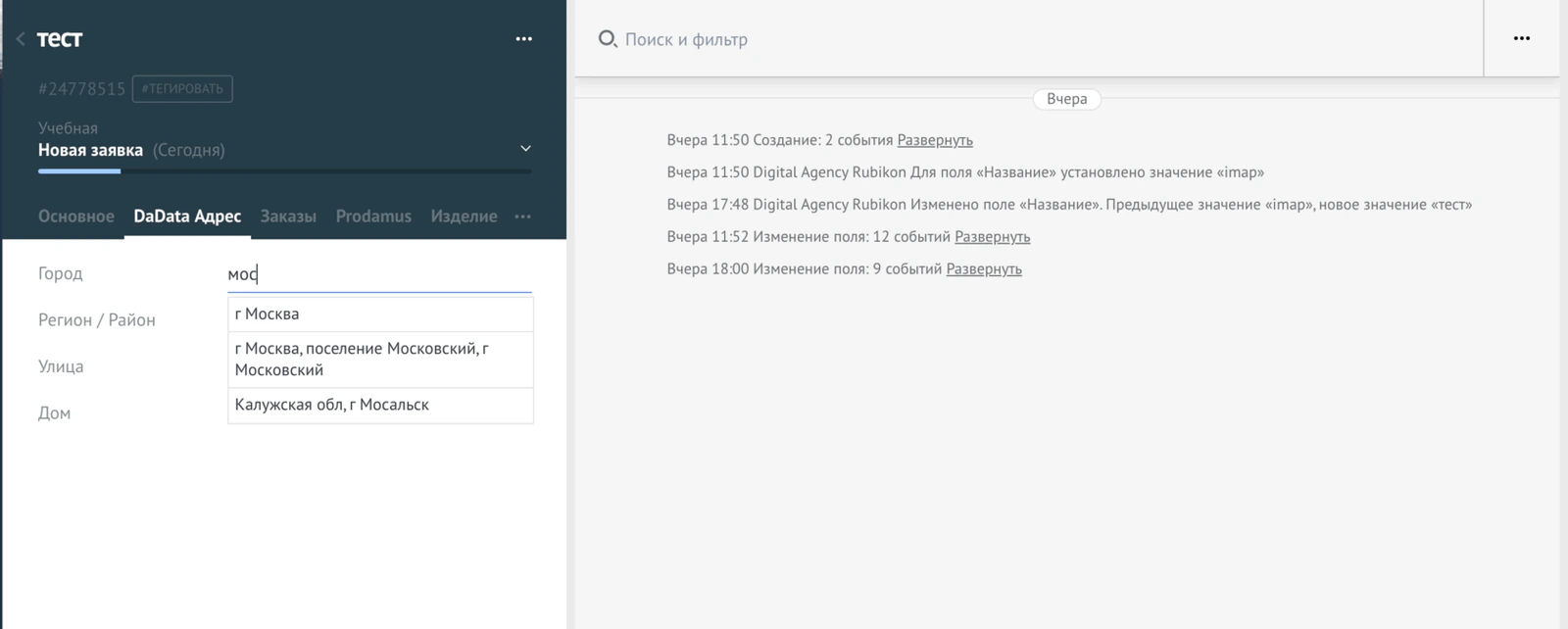
Address autofill in amoCRM
Enter the address in seconds - the system will automatically prompt and fill in the data without errors or manual entry
Where time is wasted and mistakes occur when entering addresses
Managers enter addresses manually, make mistakes, and create unstructured data in the CRM. This slows down work and complicates further processing of information.
Manual address entry
Each address is entered manually - this is time-consuming and distracts from working with clients

Errors and inaccuracies in data
Typos and different record formats lead to incorrect data in CRM

Chaos and duplication
The same address can be written in different ways - the data becomes unsystematic and difficult to analyze

How the widget works

Enter the address in the field - the system will immediately offer options to choose from
Select the desired option, and all data (city, street, house and other parameters) will be entered automatically
The address is saved in CRM in a single format - without typos, chaos and manual entry
Frequently asked questions
Everything about the widget: when to use it, how to configure it, and what are the nuances?
How does address autocomplete work?
You start entering the address, the system offers options, and after selecting it automatically fills in all the data
What data is being substituted?
City, street, house and other elements of the address - depending on the selected option
Do I need to enter the address completely manually?
No, just start entering - the system itself will offer ready-made options
Is it possible to edit the address after filling it out?
Yes, you can change any data manually after autofill
Where does the data come from?
Data is pulled from trusted sources through integration with Dadata
In what format are addresses saved?
Addresses are saved in a single and structured format without errors or duplication
How is this useful for business?
You speed up the work of managers, reduce the number of errors and maintain order in CRM data