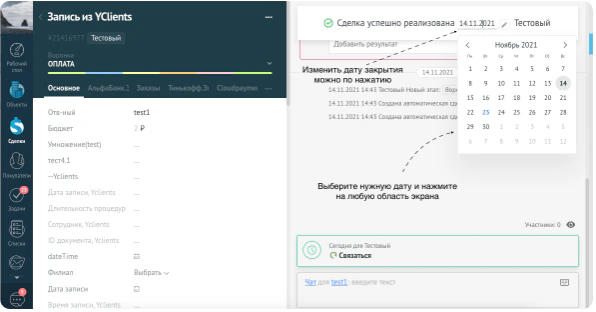
Is it possible to change the closing date of a deal after it is completed?
Yes, the widget allows you to edit the date even after the deal has been transferred to the status “Successfully completed” or “Closed and unrealized”
Why change the closing date?
This helps correct errors and maintain correct sales and pipeline analytics
Is it possible to restrict access to date editing?
Yes, you can configure which users have the right to change the closing date of a deal.
Does changing the date affect reports?
Yes, the correct closing date allows you to receive accurate analytics and reports on deals
Can I change the date at any time?
Yes, editing is available at any time after the deal is closed
Does the widget change the standard amoCRM logic?
No, it only adds the ability to edit the date without disrupting the CRM
Is the widget suitable for any pipelines?
Yes, you can use it in all pipelines inside amoCRM
How is this useful for business?
You receive accurate deal data, correct analytics and the ability to correct errors without restrictions
Is it difficult to customize the widget?
Setup takes minimal time and does not require technical skills. All parameters are set directly in the amoCRM interface