Autofill company details using INN and BIK in amoCRM
Tired of manually filling out company and bank information? Enter your INN or BIC - the system will automatically add the details to the deal
Where time is wasted entering company details manually
Managers manually enter company and bank data, make mistakes and waste time on routine operations instead of working with clients
Manual entry of details
INN, BIC, company name - everything is entered manually. It takes time and distracts you from working with clients.

Data errors
Typos and inaccuracies in details lead to problems in documents and accounting

Duplication and chaos in CRM
Identical companies are created differently, data is not standardized and it is difficult to maintain order

How the widget works

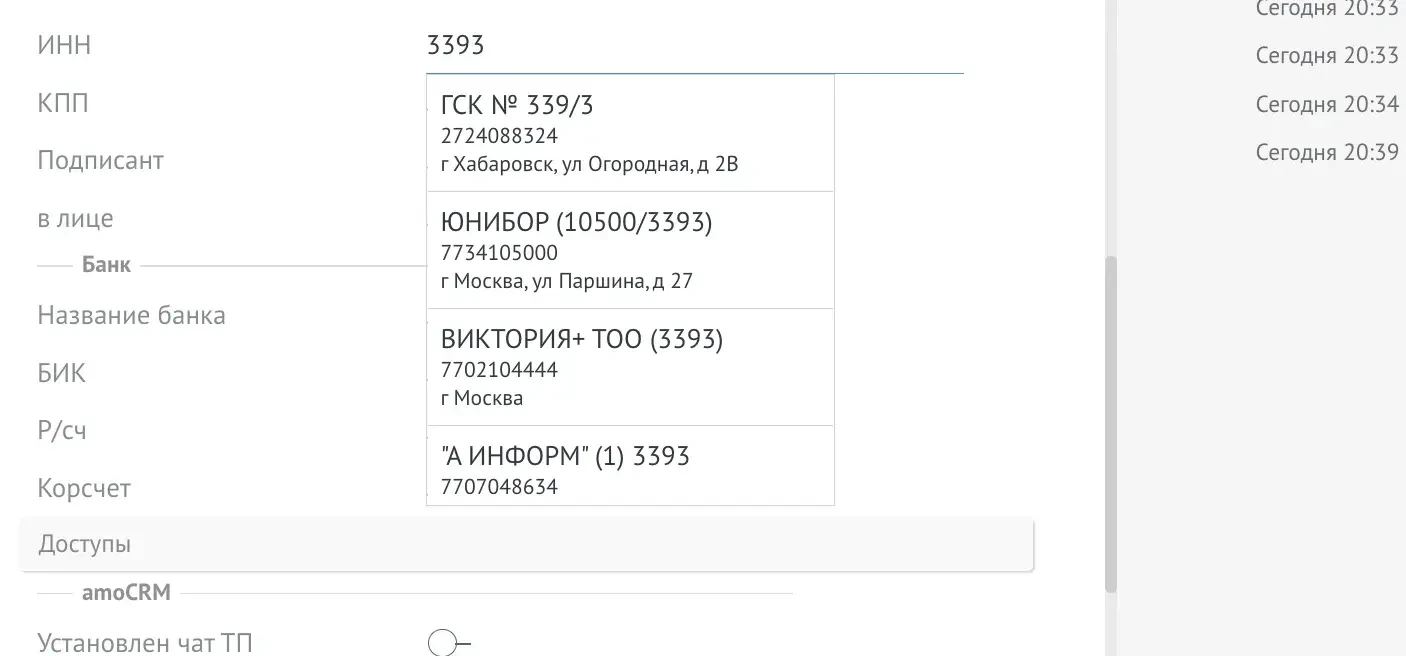
Indicate the TIN of the company or BIC of the bank in the deal or contact card
The system finds the organization and fills in the details: name, checkpoint, address, bank and other data
Details are immediately saved in CRM - without errors, duplication and unnecessary routine
Frequently asked questions
Everything about the widget: when to use it, how to configure it, and what are the nuances?
How does auto-filling details work?
You enter your INN or BIC, after which the system automatically finds and fills in the company or bank data in the CRM
What data is filled in?
Company name, checkpoint, address, bank details and other available data - depending on the source
Do I need to manually configure fields?
No, you select the required fields once - then the data is entered automatically
Is it possible to edit data after autofilling?
Yes, all data can be changed manually after substitution
Where does the data come from?
Data is pulled from trusted sources through integration with Dadata
What if the company is not found?
You can fill in the data manually - the widget does not limit standard CRM work
Is the widget suitable for any pipelines?
Yes, you can use it in any pipelines and processes inside amoCRM